Recently we released a pure JavaScript implementation of in-browser player for our lossless video codec
ScreenPressor. It supersedes our old player
made with Flash. Here's some anecdotal evidence of how fast current JavaScript interpreters in browsers are.
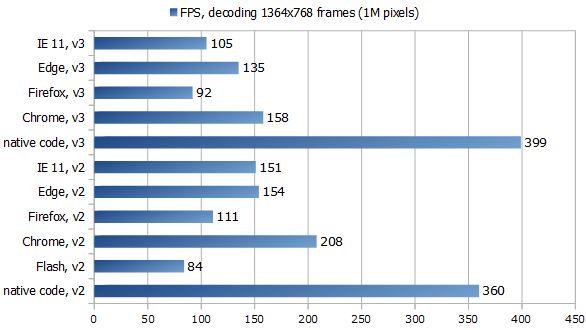
The chart shows Frames Per Second:
Here we took a screen recording with resolution 1364x768 - 1M pixels, 4MB RGB32 data per frame -
and measured how fast our players could decode 480 consequent delta-frames when seeking from 0 (a key frame)
to frame 490 (while the next key frame is the 500th).
When the player is at position 0 it decodes and buffers
a few frames in advance, in this case 10, so when seeking then to frame 490 the number of frames to decode is
480. You can see the test video here
(btw this sample shows ~300x lossless compression).
"v2" and "v3" mean codec versions: we tested implementations of both 2nd and 3rd versions of ScreenPressor,
they use different entropy coders and have other differences.
Of course the speed depends a lot on the video content, how complex and diverse it is, so on different videos numbers
will be different. In typical screen videos there are not so many changes from frame to frame, most of the frame
can be copied from previous one, this includes scrolling and window movement scenes. But anyway it's quite impressive
how a JS-based player can produce 150-200 4MB frames a second.
In this case we can see how different JS speed is in different modern browsers. Firefox Quantum is incredibly fast and smooth
when it comes to browsing sites but its JS engine in this test is slower than of MS Internet Explorer and Edge, while
Chrome is king when it comes to JS speed.
All JavaScript engines here worked faster than Flash, this probably shows how they evolved since our
previous test
three years ago. However native code is still 2-4 times faster than JS, thanks to well optimizing vectorizing compiler,
more compact data representation and no dynamic types with their runtime costs.
More information about both (JS and Flash) web players for ScreenPressor and more samples
here.
Just noticed our company listed on the page
Organizations using the D Language, right under eBay and Facebook. Really nice to find oneself in such a good company!
Indeed, Video Enhancer, BlogSort, Undup and AutoVideoEnhance are all written in D programming language. As well as some minor internal tools we use, like the engine for this tiny blog.
Often when people first hear about Video Enhancer and its main feature, super resolution video resizing, they say "No way, it cannot work! If information is lost in downsizing you cannot get it back." And when we're talking about total information in a video they are absolutely right. However when looking at particular frames... Here's an experiment for you. I captured a couple of phrases with my two revolutionary ASCII video cameras that capture text, unfortunately one camera has low resolution and only captures two out of three letters, and the other camera has a nice resolution but results are noisy. Here are a few frames captured by my ASCII cameras. Can you guess what were the original phrases?
As you might know, in the world of Windows programming COM is still actively used, alive and kicking after all these years. It must be usable from plain C so for error handling they use return codes: most functions return HRESULT, an integer that is zero if all went well, negative in case of error and positive if it went "okay but...". Return codes should not be ignored or forgotten, they need to be handled, and in practice it is often the case that all local handling logic reduces to just stopping what we were doing and passing the error code up the stack, to the caller. In languages like Go it looks like this:
err := obj1.Action1(a, b)
if err != nil {
    return err
}
err := obj1.Action2(c, d)
if err != nil {
    return err
}
err := obj2.Action3(e)
if err != nil {
    return err
}
etc. Each meaningful line turns into four, in the best tradition of
There is a famous in PLT community paper on free theorems, giving praise to generics and parametricity allowing you to infer a lot about some generic function behavior just from its type, because since such generic function does not know anything about the type of value it gets, it cannot really do much with this value: mostly just pass it around, store somewhere or throw away. On the other end of generics spectrum (call it "paid theorems" if you will) we have languages like D where a generic function can ask different questions about the type it gets as argument and depending on the answers, i.e. properties of the passed type, do one thing or another. I think this end is more interesting and practical.
This autumn, by request of our client, we developed a video deshaking method that
works in a single pass, in streaming mode. I know there is a very nice Deshaker filter
for VirtualDub but it works in two passes: first it collects motion data, then plans
for whole movie and in the second pass performs actual changes to the video. When
your video processing pipeline is quite heavy, loaded with many filters or something
computationally expensive, doing the work twice or saving it into a huge lossless file
and then processing twice with Deshaker can be extremely time-consuming. So, there
might be a need for something quicker, working in one pass.
Here are a couple of examples showing our own deshaker in action (before/after) :
Recently I saw a talk by one of active Idris contributors:
David Christiansen - Coding for Types: The Universe Pattern in Idris where he shows some uses of dependent types. I'd like to use some of those examples to demonstrate
that we actually have dependent types in D, or, really, in part of it. First let me show some original examples in Idris, a full blown depentently typed language, and then we'll translate them to D closely.
In the talk David says that in dependently typed languages we have types as first class values: you can create them
on the fly, return from functions, store in data structures and pass around, however you shouldn't pattern-match on them
because if we allow pattern-matching on types we lose free theorems (id may start to return 42 for all natural arguments) and this prevents proper type erasure when compiling the programs. I'm not sure if matching on types is actually banned in Idris now, I remember a few versions ago it actually worked, at least in simple cases. But sometimes doing different things depending on type passed is what we do want, and for this cases David describes what he calls The Universe Pattern:
you take the types you wish to match on, encode them in a simple data type (as in AST), match on this data type, and when you need actual types use a mapping function from this encoding to actual types.
If you developed your own video codec and wanted to watch the video in a browser
what would you do? That is a question we faced a few years ago with
ScreenPressor and at that time
the answer was Flash. It was cross-platform, cross-browser, widely available
and pretty fast if you use the right programming language, i.e. Haxe instead of ActionScript.
So we implemented a decoder
(and a player) in Flash back then.
But now Flash is clearly on decline, supported only on desktop, meanwhile different browsers
in a race for speed made JavaScript significantly faster than it was a few years ago.
So I decided it's time to check how JS can compare to Flash when it comes to
computation-intensive task such as a video codec. I really don't like the idea
of writing in pure JavaScript 'cause the language is such a mess, I'd rather
use something that at least gets closures, objects and modules right and has
some static type checking. Since I already had working code in C++ for native code
and in Haxe for Flash, obvious choices were using Emscripten to generate asm.js from
C++ code and retargeting Haxe code to JS (just another target for Haxe compiler).
Also, Dart is pretty close as a language (porting to Dart is simpler than rewriting in
some Haskell or Lisp clones) and Dart VM is marketed as a faster and better replacement
for JS engines, so I was curious to try it.
To test and compare different languages and compilers I decided to implement
in them a small part of the codec, the most CPU consuming one:
decompression of a key frame to RGB24. I'm going to show the results first and then
follow with some notes on each language.
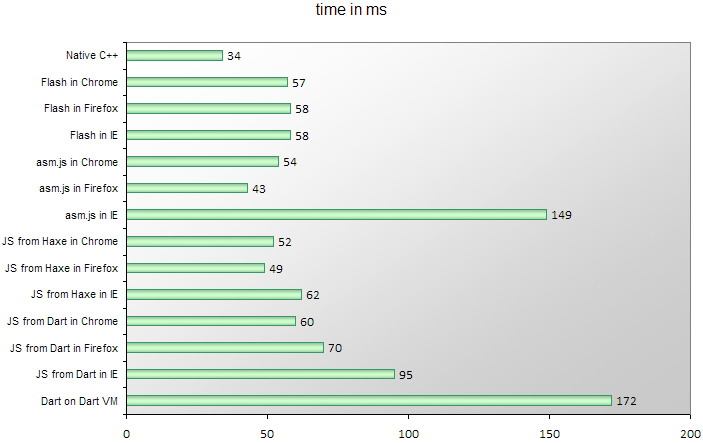
Here are the times for decompressing one particular 960x540 px frame on a laptop
with a 2.4 GHz Core i3 CPU and Windows 8.1:
This is a story that happened during the development of
Video Enhancer a few minor versions ago.
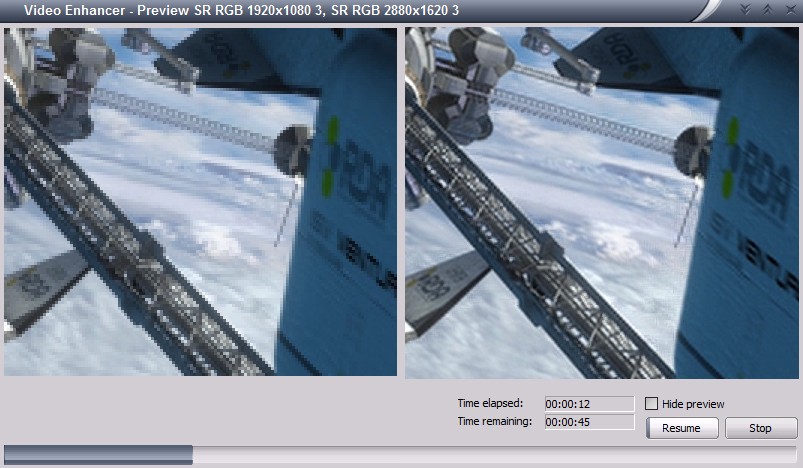
It is a video processing application that, when doing its work, shows two
images: "before" and "after", i.e. part of original video frame and the same part
after processing.
It uses DirectShow and has a graph where vertices (called filters) are things like
file reader, audio/video streams splitter, decoders, encoders, a muxer, a file writer
and a number of processing filters, and the graph edges are data streams.
What usually happens is: a reader reads the source video file, splitter splits it in two
streams (audio and video) and splits them by frames, decoder turns compressed frames
into raw bitmaps, a part of bitmap is drawn on screen (the "before"), then
processing filters turn them into stream of different bitmaps (in this case our
Super Resolution filter increases resolution, making each frame bigger),
then a part of processed frame is displayed on screen (the "after"), encoder
compresses the frame and sends to AVI writer that collects frames from both video and audio streams
and writes to an output AVI file.
Doing it in this order sequentially is not very effective because now we usually have multiple CPU
cores and it would be better to use them all. In order to do it special Parallelizer filters were
added to the filter chain. Such filter receives a frame, puts it into a queue and immediately returns.
In another thread it takes frames from this queue and feeds them to downstream filter. In effect,
as soon as the decoder decompressed a frame and gave it to parallelizer it can immediately start
decoding the next frame, and the just decoded frame will be processed in parallel. Similarly,
as soon as a frame is processed the processing filter can immediately start working on the next frame
and the just processed frame will be encoded and written in parallel, on another core. A pipeline!
At some point I noticed this pipeline didn't work as well on my dual core laptop as on quad core desktop,
so I decided to look closer what happens, when and where any unnecessary delays may be. I added some
logging to different parts of the pipeline and, since in text form they weren't too clear, made a converter
into SVG, gaining some interesting pictures.
About a year ago one blog post titled
"Why mobile web apps are slow"
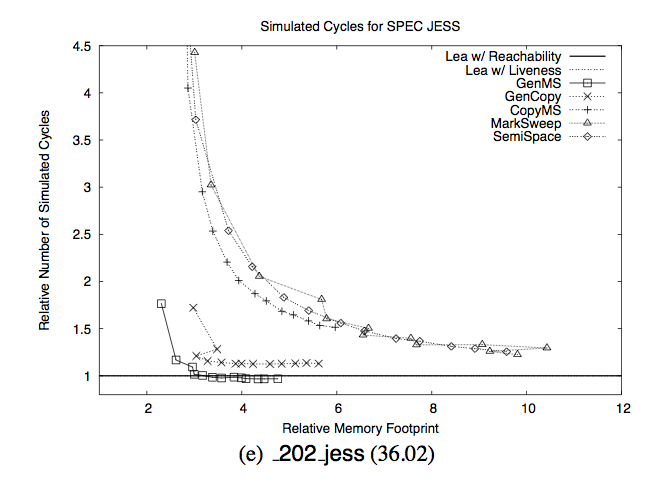
made a lot of fuss in the internets. In the section about garbage collection it showed one
interesting chart taken from a 2005
paper
"Quantifying the Performance of Garbage Collection vs. Explicit Memory Management":
The intent was to frighten people and show how bad GCs were: they allegedly make your program super
slow unless you give them 5-8x more memory than strictly necessary. You may notice that the author has
chosen a chart for one particular program from the test set and you can rightfully guess that
most other programs didn't behave that bad and average case picture is much less frightening.
However what I immediately saw in this graph is something different and probably more important.








 RSS
RSS